Callback Endpoints Security
When implementing callback endpoints for payment processing, it is crucial to ensure that these endpoints are secure and can only be accessed by authorized parties.
Overall guidelines
Here are some best practices to enhance the security of your callback endpoints:
- Disable caching services: Prevent callbacks from failing by disabling caching services such as CloudFlare, Varnish, and similar solutions for your callback endpoints.
- Use double quotes for HTML attributes: Ensure all image, link, stylesheet, and form elements use double quotes for attributes, e.g.
<img src="image.png"/>. - Restrict access by IP: Only allow traffic from AltaPay's gateway IP addresses (185.206.120.0/24(ipv6: 2a10:a200::/29), 185.203.232.129 and 185.203.233.129). For example, use
.htaccessrules: - Use UTF-8 encoding: Encode your callback page using UTF-8 or use HTML entities to ensure proper character representation.
- Limit resource size: Ensure that resources (HTML, images, CSS files) do not exceed 2 MB in size.
- Restrict callback URL ports: Only use ports 443 (HTTPS) and 80 (HTTP) for callback URLs.
- Verify message authenticity: Use signature based on the secret defined by you in the AltaPay Merchant Interface to verify that the callback message is authentic and has not been tampered with.
Secure your endpoint
Secret setup
- Log in to your Merchant Interface.
- Navigate to Settings > Configuration page. Under Webhook Secrets section, press Add Secret button.
- Enter a strong secret (minimum 16 characters, recommended 32 characters) and press Save. Please write down the secret as it will not be shown again.
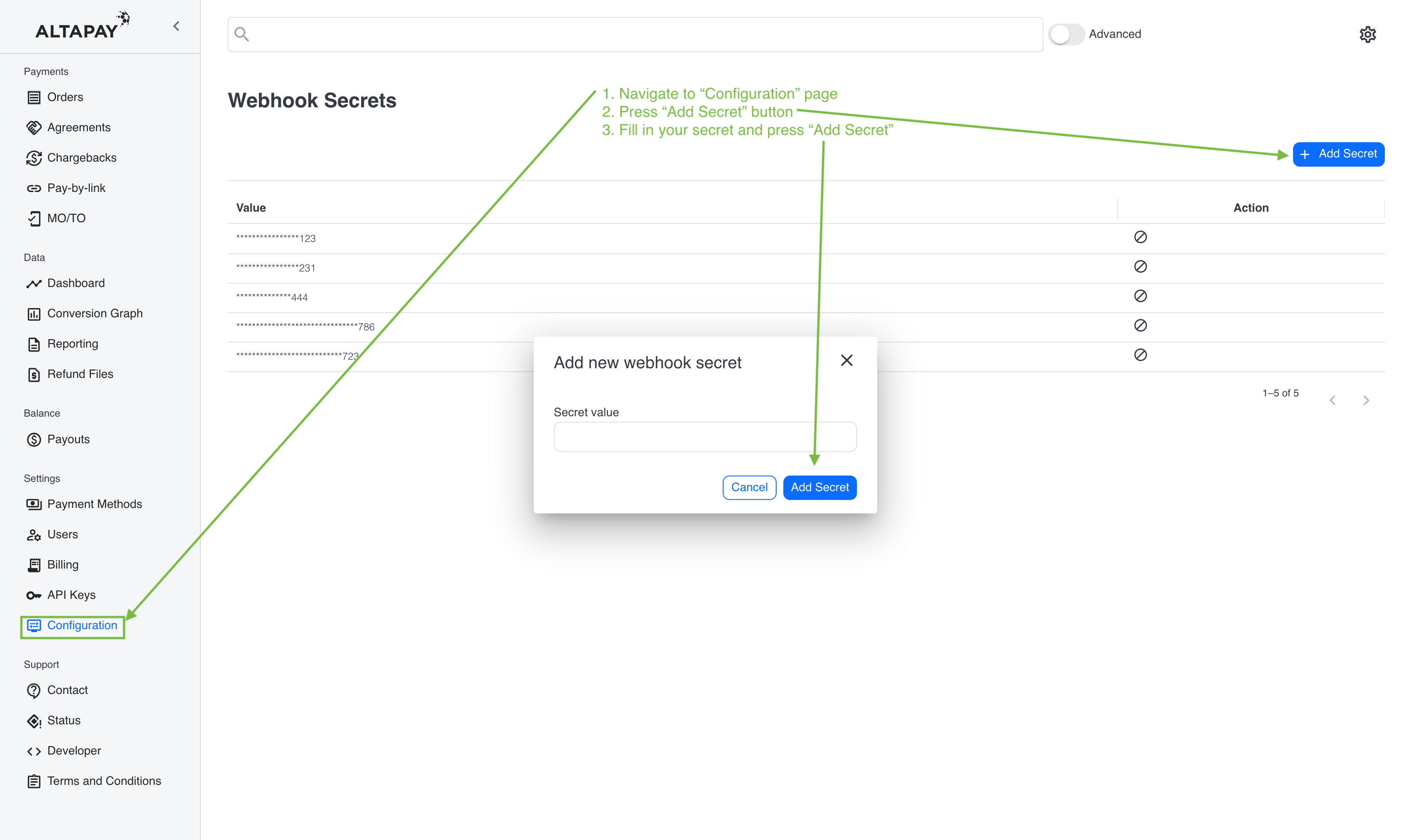
- Use this secret in your server-side code to verify incoming callback requests.
Sandbox environment
In sandbox environment (testgateway.altapaysecure.com or onl.preprod.mpg.market-pay.com), the secret is already configured. Please use the value of 8723ehwfsfhkASoxSIDAU8s3wqsfHFAS as your secret for testing purposes.
Message verification
To ensure the authenticity and integrity of callback requests, AltaPay - A MarketPay Company uses HMAC signatures in the AltaPay-Signature HTTP request header.
AltaPay-Signature:
    t=1231412314789;
    s0=b436e3e86cb3800b3864aeecc8d06c126f005e7645803461717a8e4b2de3a905;
    s1=290f14398bf8c0959dfc963e2fd9c377534c6fec1983025d2ab192382f132b92
AltaPay-Signature header contains following fields separated by semicolons:
t- timestamp of signature generation (in milliseconds since Unix epoch)s0,s1, ... - signatures generated using your shared secrets (supporting secret rotation)
Follow these steps to verify incoming requests:
-
Parse the header
- Read
AltaPay-SignatureHTTP header - Split the header by
;to get each field. - Extract the timestamp (
t) and all signature values (s0,s1, ...).
- Read
-
Prepare the payload
- Read the raw request body as a UTF-8 string.
- Concatenate the raw request body, a dot (
.), and the timestamp provided in the header:
-
Verify the signature
- In most of the cases you will have one secret (
s0), but you can have multiple secrets for temporarily during secret rotation - see how to support secret rotation. - Calculate HMAC-SHA256 of the prepared payload using your secret.
- Compare the calculated HMAC with signature extracted from the header.
- In most of the cases you will have one secret (
-
Validate the timestamp
- Optionally, check the timestamp to ensure the request is recent and not replayed or cached by a man-in-the-middle.
Note
Only Checkout API callbacks are signed (except for form styling request). Other AltaPay services do not use this mechanism at the moment.
Secret rotation
If you need to change your shared secret, you can do so without downtime by following these steps:
- Add the new secret in your AltaPay Merchant Interface.
- Update your servers to use the new secret for generating signatures.
- Continue to accept requests signed with both the old and new secrets until you are confident that all clients have switched to the new secret.
- Remove the old secret from your AltaPay Merchant Interface once you are sure it is no longer in use.
During the transition period, your verification logic should check signatures against both the old and new secrets.
We will send multiple signatures in the AltaPay-Signature header to accommodate this transition, under the keys s0, s1, etc. For example:
AltaPay-Signature: t=1231412314;s0=b436e3e86cb3800b3864aeecc8d06c126f005e7645803461717a8e4b2de3a905;s1=290f14398bf8c0959dfc963e2fd9c377534c6fec1983025d2ab192382f132b92
In transition period you need to calculate the HMAC-SHA256 for one or many secrets available on your server (depending on your setup) and compare it against all provided signatures. If any match, the request is valid. We recommend keeping the old secret for a short period (e.g., 24 hours) to ensure all clients have updated, but remove it as soon as possible to maintain security.