GooglePay

|
GooglePay provides a fast, simple way to pay on sites, in apps, and in stores using the cards saved to your Google Account. It protects your payment info with multiple layers of security and makes it easy to store loyalty cards, gift cards, and offers. |
 GooglePay integration prerequisites
Terminal wallet parameters from the gateway are defined per individual acquirer. To keep the checkout service flexible and acquirer-agnostic, we retrieve these parameters using the generic payment method identifier instead of a specific acquirer name. This ensures that if a terminal uses multiple acquirers for the same wallet, or if new ones are added in the future, the checkout service pulls the correct configuration based on the selected wallet.
Integration using the Gateway directly
For merchants integrating directly to the Gateway without Checkout API.
- Pre-step: Setting up a server-to-server session. Create a session containing all information needed to process the payment (except for the payment instrument data). This call returns a session ID required in the next call. For more details on setting the checkout session, see checkoutSession.
- Transaction Execution: Provide the payment instrument data in a second server-to-server call on the gateway endpoint for the reservation flow. The data is deciphered on the gateway and processed.
GooglePay flow
The GooglePay flow is described in the following diagram. In this diagram you will be able to see the different steps in the GooglePay flow.
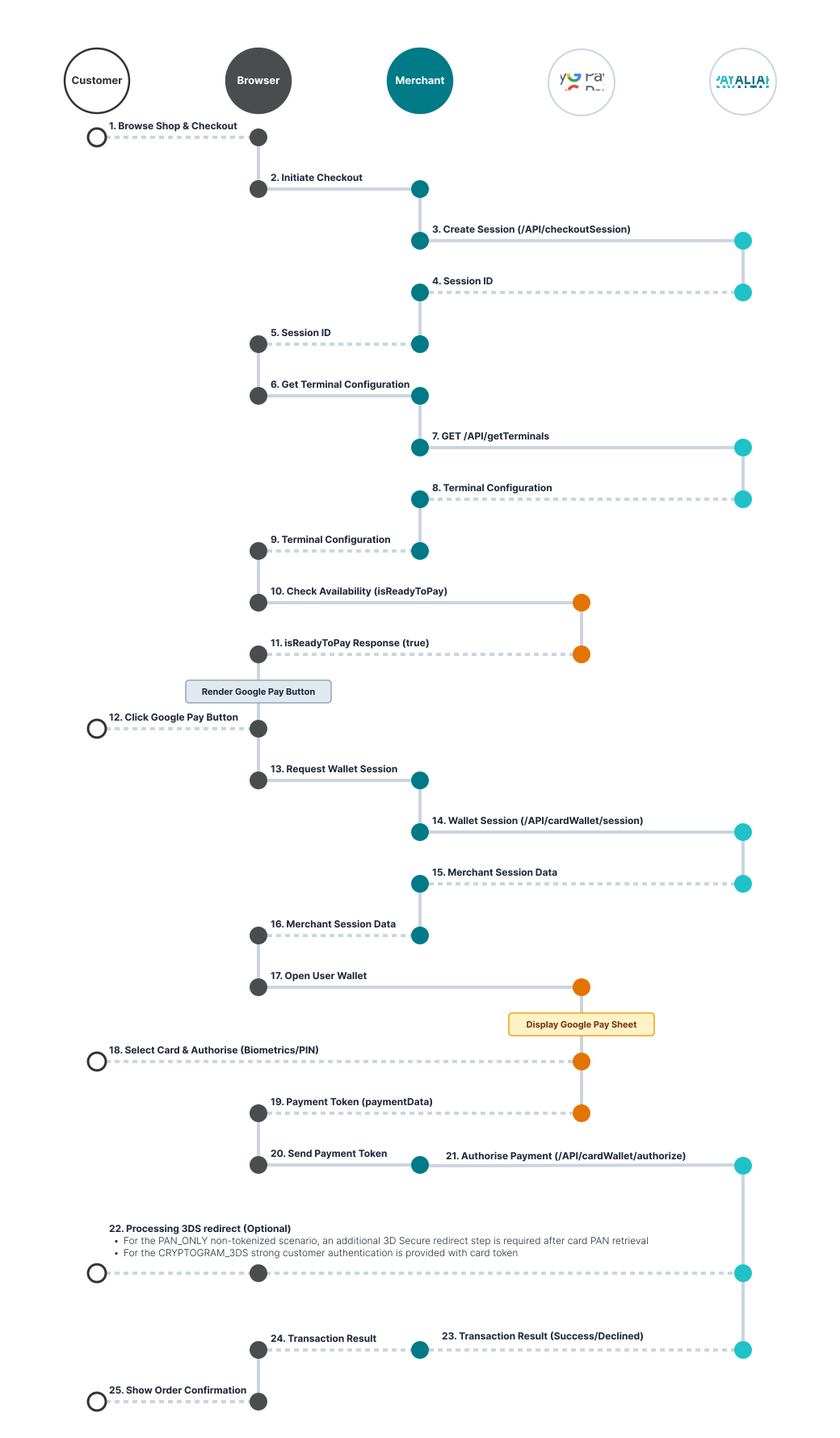
GooglePay Specific Notes
Due to the nature of GooglePay, it might return cards on file (simple browser) or a device token on an Android-powered device authenticated with a 3-D Secure cryptogram.
- If you support cards on file, ensure that you trigger 3D Secure (step-up authentication) for GooglePay transactions in the same way that you trigger 3D Secure for normal card transactions.
-
PAN_ONLY (non-tokenized) scenario: When using a browser on a non-Android device, the redirect for 3DS processing needs to be handled. If you are using the Checkout JS script, it will be processed automatically. If you provide your own implementation, you need to handle it yourself. E.g. using Gateway integration you need to:
- Provide necessary attributes to determine browser fingerprint information used in 3DS processing on the
API/cardWallet/sessionrequest. - Handle redirect response if it occurs on the
API/cardWallet/authorizerequest.
- Provide necessary attributes to determine browser fingerprint information used in 3DS processing on the
- CRYPTOGRAM_3DS (tokenized) scenario: If the data returned is authenticated with a 3-D Secure cryptogram, it can be passed directly as 3DS authentication results are already present.
- The GooglePay API tokenization specification type must be configured to use our gateway.
- Deciphering the retrieved token is handled by the internal service on our backend, which requires the token to be passed from the frontend exactly as provided by Google.